
前回サンプル的に作成した一括データ投入用のエンドポイントbulk.phpでは、インスタンス化するクラスに直接データベースの接続情報を受け渡してDBに接続していたが、これはセキュリティ的に良くない。ソースコード内に機密情報であるデータベースへの接続情報がハードコーディングされてしまっているからだ。まぁ、bulk.phpは(エンジニアの)管理者がデータ投入時にコマンドラインからしか使わないツールになるので、別にこのままでもアプリケーションの脆弱性にはならないんだが、コード的に美しくないので、正規処理に書き直すことにする。
データベース接続情報(DSN)の別ファイル化
データベースに接続するための情報セットはDSN(Data Source Name)と呼ばれる。ネットワーク上のIPアドレスをドメイン名に引き当てる仕組みであるDNS(Domain Name System)と字面が似ているが、全く異なる代名詞なので混同しないように(笑)
さて、このDSNは機密情報となるため、漏えいするとデータベースへの不正アクセスが可能になり、情報漏えい等の重大なインシデントが発生してしまう。そのため、この取り扱いは慎重に行わなければならない。もし、業務システムの開発などで、プログラムのソースコード内にハードコーディングなんてしてしまうと、一発アウト、クライアントから瑕疵担保責任を問われた時点で損害賠償に発展しかねいのだ。
ということで、このDSNはプログラムから分離して、ソースコード管理から除外してしまうのが正解だ。今回は、PHPの組み込みメソッドで容易に取り扱えるJSON形式のファイルにして、分離してしまう(記述が楽で見やすいYAML形式も良いのだが、これを読み込むには別途ライブラリを準備するなど手間がかかるので、今回は却下した)。
touch database.json
プロジェクトディレクトリ直下に、database.jsonのファイルを作成して、データベースの接続情報を下記のように記述する。
{
    "production": {
        "db_driver":   "mysql",
        "db_name":     "mhr_simulator_db",
        "db_user":     "username",
        "db_password": "password",
        "db_host":     "127.0.0.1",
        "db_port":     3306,
        "db_charset":  "utf8mb4",
        "db_collate":  "utf8mb4_general_ci"
    }
}
アプリ側ではデータベース接続時にこのDSNを読み込んで利用することになる。環境ごとに接続するデータベースを切り替えたりできるように、DSNは環境名でラップしてある。なお、今回は詳しく触れないが、このJSONファイルはソース管理から除外することになるので、後々.gitignoreファイルに追加することになる。
データベース制御にはPDOを使う
PHPにはデータベースの接続と制御をプログラムから一元的に取り扱えるPDO(PHP Data Objects)クラスというものが準備されている。このPDOクラスは、MySQLやPostgreSQL、Oracle、SQLiteなど著名なDBMSに対応しているので、利用するデータベースの種別に依存しない共通的な処理を作ることができる。また、データベースとの応答時にプリペアドステートメントを利用できるので、SQLインジェクション等の脆弱性に対して特に配慮せずとも、セキュアな処理が構築できるようになる。メリットが多いので、PHPでデータベースを取り扱うなら、これを使わない選択肢はないだろう。
では、PDOクラスを使って、データベース接続処理をコーディングする。書き直すファイルは、抽象クラスのabstractClass.phpである。
<?php
/**
 * Holds abstract class for MHRise SkillSimulator
 *
 * @package MHRSS
 * @since   1.0.0
 */
namespace MHRise\SkillSimulator;

if ( !class_exists( 'abstractClass' ) ) :

abstract class abstractClass {
    const VERSION   = '1.0.0';

    /**
     * Holds application's directory path
     *
     * @access protected
     * @var    string
     */
    protected $app_dir;

    /**
     * Holds full path of configures file
     *
     * @access private
     * @var    string
     */
    private $conf_path;

    /**
     * Holds singleton objects (= instance)
     *
     * @access private
     * @var    array
     */
    private static $objects = [];

    /**
     * Holds options array
     *
     * @access protected
     * @var    array
     */
    protected $options = [];


    /**
     * Holds database handler object
     *
     * @access public
     * @var    object
     */
    public $dbh;

    /**
     * Constructor
     *
     * @access protected
     */
    protected function __construct(
        private string $env       = 'production',
        private string $conf_file = 'database.json',
    ) {
        $this->app_dir   = str_replace( DIRECTORY_SEPARATOR, '/', dirname( __DIR__ ) );
        $this->conf_path = "{$this->app_dir}/{$this->conf_file}";

        $this->load_config();
        $this->connect_database();
        $this->init();
    }

    /**
     * Returns singleton instance as object
     *
     * @access public
     */
    public static function get_object( ?string $class = null ): object {
        if ( !class_exists( $class ) ) {
            $class = get_called_class();
        }
        if ( !isset( self::$objects[$class] ) ) {
            self::$objects[$class] = new $class;
        }
        return self::$objects[$class];
    }

    /**
     * Loads configures for application from setting file
     *
     * @access private
     */
    private function load_config(): void {
        if ( file_exists( $this->conf_path ) ) {
            $_conf   = json_decode( @file_get_contents( $this->conf_path ), true );
            $_loaded = match ( json_last_error() ) {
                JSON_ERROR_NONE => true,
                JSON_ERROR_DEPTH => 'Config file is maximum stack depth exceeded.',
                JSON_ERROR_STATE_MISMATCH => 'Config file is underflow or the modes mismatch.',
                JSON_ERROR_CTRL_CHAR => 'Config file is unexpected control character found.',
                JSON_ERROR_SYNTAX => 'Syntax error, malformed JSON of config file.',
                JSON_ERROR_UTF8 => 'Config file is malformed UTF-8 characters, possibly incorrectly encoded.',
                default => 'Unknown error for loading config file.'
            };
            if ( is_bool( $_loaded ) && $_loaded ) {
                $this->options = $_conf;
            } else {
                die( $_loaded . PHP_EOL );
            }
        } else {
            die( 'Config file could not be loaded.' );
        }
    }

    /**
     * Called method when object is constructed
     *
     * @access protected
     */
    abstract protected function init();

    /**
     * Connect database
     *
     * @access private
     */
    private function connect_database(): void {
        $_opts = $this->get_option( $this->env );
        $_dsn  = sprintf( '%s:host=%s;port=%d;dbname=%s;charset=%s', $_opts['db_driver'], $_opts['db_host'], $_opts['db_port'], $_opts['db_name'], $_opts['db_charset'] );
        try {
            $this->dbh = new \PDO(
                $_dsn,
                $_opts['db_user'],
                $_opts['db_password'],
                [
                    \PDO::ATTR_PERSISTENT => true,
                    \PDO::ATTR_ERRMODE => \PDO::ERRMODE_EXCEPTION,
                ]
            );
            if ( !empty( $_opts['db_collate'] ) ) {
                // Check database collation
                $stm = $this->dbh->query( 'SELECT @@collation_database' );
                $current_collate = $stm->fetchColumn();
                if ( $_opts['db_collate'] !== $current_collate ) {
                    die( "Database Connection Error: Specified database collation is different from defining." . PHP_EOL );
                }
            }
            // After connecting completely, modify the db_user and db_password in the option property.
            unset( $this->options[$this->env]['db_user'], $this->options[$this->env]['db_password'] );
        } catch ( \PDOException $e ) {
            die( "Database Connection Error: {$e->getMessage()}" . PHP_EOL );
        }
    }

    /**
     * Retrives an option
     *
     * @access protected
     */
    protected function get_option( array|string $option, mixed $default = false ): mixed {
        if ( !is_array( $option ) ) {
            $option = [ $option ];
        }
        return self::_get_option( $option, $default, $this->options );
    }

    /**
     * Recursively retrieves a multidimensional option
     *
     * @access private
     */
    private function _get_option( array $option, mixed $default, &$options ): mixed {
        $_key = array_shift( $option );
        if ( !isset( $options[$_key] ) ) {
            return $default;
        }
        if ( !empty( $option ) ) {
            return self::_get_option( $option, $default, $options[$_key] );
        }
        return $options[$_key];
    }

    /**
     * Sets an option
     *
     * @access protected
     */
    protected function set_option( array|string $option, mixed $value ): void {
        if ( !is_array( $option ) ) {
            $option = [ $option ];
        }
        self::_set_option( $option, $value, $this->options );
    }

    /**
     * Recursively sets a multidimensional option
     *
     * @access private
     */
    private function _set_option( array $option, mixed $value, &$options ) {
        $_key = array_shift( $option );
        if ( !empty( $option ) ) {
            if ( !isset( $options[$_key] ) ) {
                $options[$_key] = [];
            }
            return self::_set_option( $option, $value, $options[$_key] );
        }
        $options[$_key] = $value;
    }

    /**
     * Catch Requests
     *
     * @access protected
     */
    protected function catch_request(): void {
        if ( !empty( $_POST ) ) {
            $this->set_option( 'post', filter_input_array( INPUT_POST, FILTER_SANITIZE_STRING ) );
        }
        if ( !empty( $_GET ) ) {
            $this->set_option( 'get', filter_input_array( INPUT_GET, FILTER_SANITIZE_STRING ) );
        }
    }

}

endif;
だいぶコード量が増えたが、上記のコードが、今回のアプリケーション全体としての抽象クラスの完成形に近いものだ。
おおまかに処理を説明すると、別ファイル化したDSNのJSONファイルはコンストラクタで呼ばれるload_configメソッドで読み込まれ、クラス内のメンバ変数$optionsにキャッシュされる。このメンバ変数のアクセス修飾子はprotectedなのでクラス内ではいつでも再利用できるが、クラスの外からはアクセスできないようになっている。
次に、connect_databaseメソッドで、PDOクラスを利用してデータベースに接続、接続が完了してスタンバイ状態となったPDOクラス自体を、メンバ変数$dbhに格納している。これでこの抽象クラスとこれを継承したクラスでは、$this->dbhを呼ぶことによっていつでもPDOを経由して接続先のデータベースを操作できるようになる。あと、念のため、データベースに接続が完了した時点で、クラス内にキャッシュしてあるDSNからユーザ名とパスワードのみを破棄している。
後は、継承先のクラスで定義が強制されているinitメソッドを呼び出して、後続処理は継承先に移るという建付けだ。
継承先のコアクラスにインポート処理を実装する
今回、バルクユーザ向けに提供する機能は、CSVファイルを読み込んでそのデータをデータベースに一括で投入するものとなる。抽象クラスを継承したコアクラスbulkCore.phpに、その処理を実装して行く。
<?php
/**
 * Holds final class for bulk user
 *
 * @package MHRSS
 * @since   1.0.0
 */

namespace MHRise\SkillSimulator;

if ( !class_exists( 'bulkCore' ) ) :

final class bulkCore extends abstractClass {

    /**
     * Load a trait that defines common methods for database operations
     */
    use DBHelper;

    /**
     * Initialization
     *
     * @access public
     */
    public function init() {
        // Nothing to do
    }

    /**
     * Importing data from a CSV file and registering it in a database
     *
     * @access public
     */
    public function import_csv( string $table_name, string $csv_file ): void {
        if ( !file_exists( $csv_file ) ) {
            die( 'Could not find the CSV file to import.' . PHP_EOL );
        }
        if ( !$this->table_exists( $table_name ) ) {
            die( 'The table specified as the import destination does not exist.' . PHP_EOL );
        }
        $csv_data = new \SplFileObject( $csv_file, 'r' );
        $csv_data->setFlags( \SplFileObject::READ_CSV );
        $base_csv_format = $this->get_csv_format( $table_name );
        $csv_format = array_values( $base_csv_format );
        $columns = array_keys( $base_csv_format );
        $data = [];
        foreach ( $csv_data as $line ) {
            $line = array_filter( $line, function( $item, $index ) use ( &$csv_format ) {
                if ( $index <= count( $csv_format ) ) {
                    return $csv_format[$index]['label'] !== $item && (bool)preg_match( "@{$csv_format[$index]['pattern']}@", $item );
                } else {
                    return false;
                }
            }, ARRAY_FILTER_USE_BOTH );
            if ( empty( $line ) ) {
                continue;
            }
            foreach ( $line as $_idx => $_val ) {
                $_type = $csv_format[$_idx]['type'];
                switch ( true ) {
                    case preg_match( '@^(|tiny|medium|big)int@', $_type ):
                        $line[$_idx] = (int)$_val;
                        break;
                    case $_type === 'json':
                        $line[$_idx] = json_decode( str_replace( "'", '"', $_val ), true );
                        break;
                    case $_type === 'bit(1)':
                        $line[$_idx] = (bool)preg_match( '/^(true|1)$/i', $_val);
                        break;
                    case preg_match( '@^(varchar|text)@', $_type ):
                    default:
                        $line[$_idx] = (string)$_val;
                        break;
                }
            }
            $data[] = $line;
        }
        if ( empty( $data ) ) {
            die( 'Oops, this CSV does not contain any valid data to import.' . PHP_EOL );
        }
        // Truncate table before insertion
        $this->truncate_table( $table_name );
        // Start insertion with transaction
        $counter = 0;
        try {
            $this->dbh->beginTransaction();
            foreach ( $data as $_record ) {
                $target_cols = array_filter( $columns, function( $_k ) use ( &$_record ) {
                    return array_key_exists( $_k, $_record );
                }, ARRAY_FILTER_USE_KEY );
                $one_row_data = array_combine( $target_cols, $_record );
                if ( $this->insert_data( $table_name, $one_row_data ) ) {
                    $counter++;
                }
            }
            $this->dbh->commit();
        } catch ( \PDOException $e ) {
            $this->dbh->rollBack();
            die( 'Error: ' . $e->getMessage() );
        }
        if ( $counter > 0 ) {
            $message = sprintf( '%d/%d data has been completed insertion into the "%s" table.', $counter, count( $data ), $table_name );
        } else {
            $message = 'Failed to insert data.';
        }
        die( $message . PHP_EOL );
    }

    /**
     * Obtain the data validation schema for the table to be handled
     *
     * @access private
     */
    private function get_csv_format( string $table_name ): array {
        return match ( $table_name ) {
            'weapons' => [
                'id'                => [ 'type' => 'int(11) unsigned',    'pattern' => '^[0-9]+$',    'label' => '武器ID' ],
                'name'              => [ 'type' => 'varchar(255)',        'pattern' => '^.*+$',       'label' => '武器名' ],
                'type'              => [ 'type' => 'tinyint(4) unsigned', 'pattern' => '^\d{1,4}$',   'label' => '武器種' ],
                'tree'              => [ 'type' => 'varchar(255)',        'pattern' => '^.*+$',       'label' => '派生名' ],
                'rarity'            => [ 'type' => 'tinyint(4) unsigned', 'pattern' => '^\d{1,4}$',   'label' => 'レア度' ],
                'rank'              => [ 'type' => 'tinyint(4) unsigned', 'pattern' => '^\d{1,4}$',   'label' => 'ランク' ],
                'attack'            => [ 'type' => 'int(11) unsigned',    'pattern' => '^[0-9]+$',    'label' => '攻撃力' ],
                'sharpness'         => [ 'type' => 'json',                'pattern' => '^.*?$',       'label' => '切れ味' ],
                'affinity'          => [ 'type' => 'tinyint(4)',          'pattern' => '^-?\d{1,4}$', 'label' => '会心率' ],
                'defense_bonus'     => [ 'type' => 'int(11)',             'pattern' => '^[0-9]+$',    'label' => '防御力ボーナス' ],
                'element1'          => [ 'type' => 'tinyint(4) unsigned', 'pattern' => '^\d{1,4}$',   'label' => '属性1' ],
                'element2'          => [ 'type' => 'tinyint(4) unsigned', 'pattern' => '^\d{1,4}$',   'label' => '属性2' ],
                'elem1_value'       => [ 'type' => 'int(11) unsigned',    'pattern' => '^[0-9]+$',    'label' => '属性値1' ],
                'elem2_value'       => [ 'type' => 'int(11) unsigned',    'pattern' => '^[0-9]+$',    'label' => '属性値2' ],
                'slot1'             => [ 'type' => 'tinyint(4) unsigned', 'pattern' => '^\d{1,4}$',   'label' => 'スロット1' ],
                'slot2'             => [ 'type' => 'tinyint(4) unsigned', 'pattern' => '^\d{1,4}$',   'label' => 'スロット2' ],
                'slot3'             => [ 'type' => 'tinyint(4) unsigned', 'pattern' => '^\d{1,4}$',   'label' => 'スロット3' ],
                'rampage_skills'    => [ 'type' => 'json',                'pattern' => '^.*?$',       'label' => '百竜スキル' ],
                'forging_materials' => [ 'type' => 'json',                'pattern' => '^.*?$',       'label' => '生産素材' ],
                'upgrade_materials' => [ 'type' => 'json',                'pattern' => '^.*?$',       'label' => '強化素材' ],
                'forge_funds'       => [ 'type' => 'int(11) unsigned',    'pattern' => '^[0-9]+$',    'label' => '生産費用' ],
                'forge_with_money'  => [ 'type' => 'int(11) unsigned',    'pattern' => '^[0-9]+$',    'label' => '購入費用' ],
                'upgrade_funds'     => [ 'type' => 'int(11) unsigned',    'pattern' => '^[0-9]+$',    'label' => '強化費用' ],
                'rollbackable'      => [ 'type' => 'bit(1)',              'pattern' => '^(TRUE|true|True|FALSE|false|False|0|1)?$', 'label' => 'ロールバック可否' ],
            ],
            'armors' => [
                'id'                 => [ 'type' => 'int(11) unsigned',    'pattern' => '^[0-9]+$',    'label' => '防具ID' ],
                'name'               => [ 'type' => 'varchar(255)',        'pattern' => '^.*+$',       'label' => '防具名' ],
                'series'             => [ 'type' => 'varchar(255)',        'pattern' => '^.*+$',       'label' => 'シリーズ名' ],
                'type'               => [ 'type' => 'tinyint(4) unsigned', 'pattern' => '^\d{1,4}$',   'label' => '部位' ],
                'rarity'             => [ 'type' => 'tinyint(4) unsigned', 'pattern' => '^\d{1,4}$',   'label' => 'レア度' ],
                'rank'               => [ 'type' => 'tinyint(4) unsigned', 'pattern' => '^\d{1,4}$',   'label' => 'ランク' ],
                'defense'            => [ 'type' => 'int(11) unsigned',    'pattern' => '^[0-9]+$',    'label' => '防御力' ],
                'level'              => [ 'type' => 'tinyint(4) unsigned', 'pattern' => '^\d{1,4}$',   'label' => 'レベル' ],
                'max_level'          => [ 'type' => 'tinyint(4) unsigned', 'pattern' => '^\d{1,4}$',   'label' => '最大レベル' ],
                'fire_resistance'    => [ 'type' => 'tinyint(4)',          'pattern' => '^-?\d{1,4}$', 'label' => '火耐性' ],
                'water_resistance'   => [ 'type' => 'tinyint(4)',          'pattern' => '^-?\d{1,4}$', 'label' => '水耐性' ],
                'thunder_resistance' => [ 'type' => 'tinyint(4)',          'pattern' => '^-?\d{1,4}$', 'label' => '雷耐性' ],
                'ice_resistance'     => [ 'type' => 'tinyint(4)',          'pattern' => '^-?\d{1,4}$', 'label' => '氷耐性' ],
                'dragon_resistance'  => [ 'type' => 'tinyint(4)',          'pattern' => '^-?\d{1,4}$', 'label' => '龍耐性' ],
                'slot1'              => [ 'type' => 'tinyint(4) unsigned', 'pattern' => '^\d{1,4}$',   'label' => 'スロット1' ],
                'slot2'              => [ 'type' => 'tinyint(4) unsigned', 'pattern' => '^\d{1,4}$',   'label' => 'スロット2' ],
                'slot3'              => [ 'type' => 'tinyint(4) unsigned', 'pattern' => '^\d{1,4}$',   'label' => 'スロット3' ],
                'skills'             => [ 'type' => 'json',                'pattern' => '^.*?$',       'label' => 'スキル' ],
                'forging_materials'  => [ 'type' => 'json',                'pattern' => '^.*?$',       'label' => '生産素材' ],
                'forge_funds'        => [ 'type' => 'int(11) unsigned',    'pattern' => '^[0-9]+$',    'label' => '生産費用' ],
            ],
            'talismans' => [
                'id'     => [ 'type' => 'int(11) unsigned',    'pattern' => '^[0-9]+$',  'label' => '護石ID' ],
                'name'   => [ 'type' => 'varchar(255)',        'pattern' => '^.*+$',     'label' => '護石名' ],
                'rarity' => [ 'type' => 'tinyint(4) unsigned', 'pattern' => '^\d{1,4}$', 'label' => 'レア度' ],
                'slot1'  => [ 'type' => 'tinyint(4) unsigned', 'pattern' => '^\d{1,4}$', 'label' => 'スロット1' ],
                'slot2'  => [ 'type' => 'tinyint(4) unsigned', 'pattern' => '^\d{1,4}$', 'label' => 'スロット2' ],
                'slot3'  => [ 'type' => 'tinyint(4) unsigned', 'pattern' => '^\d{1,4}$', 'label' => 'スロット3' ],
                'skills' => [ 'type' => 'json',                'pattern' => '^.*?$',     'label' => 'スキル' ],
            ],
            'decorations' => [
                'id'                => [ 'type' => 'int(11) unsigned',    'pattern' => '^[0-9]+$',  'label' => '装飾品ID' ],
                'name'              => [ 'type' => 'varchar(255)',        'pattern' => '^.*+$',     'label' => '装飾品名' ],
                'rarity'            => [ 'type' => 'tinyint(4) unsigned', 'pattern' => '^\d{1,4}$', 'label' => 'レア度' ],
                'slot'              => [ 'type' => 'tinyint(4) unsigned', 'pattern' => '^\d{1,4}$', 'label' => 'スロット' ],
                'skills'            => [ 'type' => 'json',                'pattern' => '^.*?$',     'label' => 'スキル' ],
                'forging_materials' => [ 'type' => 'json',                'pattern' => '^.*?$',     'label' => '生産素材' ],
                'forge_funds'       => [ 'type' => 'int(11) unsigned',    'pattern' => '^[0-9]+$',  'label' => '生産費用' ],
            ],
            'skills' => [
                'id'          => [ 'type' => 'int(11) unsigned',    'pattern' => '^[0-9]+$',  'label' => 'スキルID' ],
                'name'        => [ 'type' => 'varchar(255)',        'pattern' => '^.*+$',     'label' => 'スキル名' ],
                'description' => [ 'type' => 'text',                'pattern' => '^.*+$',     'label' => 'スキル概要' ],
                'max_lv'      => [ 'type' => 'tinyint(4) unsigned', 'pattern' => '^\d{1,4}$', 'label' => '最大レベル' ],
                'status'      => [ 'type' => 'json',                'pattern' => '^.*?$',     'label' => 'ステータス' ],
            ],
            default => [],
        };
    }

}

endif;
コアクラスでは、抽象クラスで強制されたinitメソッドを実装しているが、何もしていない。このコアクラスでは、インスタンス化されたオブジェクトから直接publicメソッドであるimport_csvを呼ぶことでCSVファイルのインポート機能が実行されるようになっている。
また、データベースに対する直接的なCRUD処理などは、このコアクラス以外でも再利用できるようにDBHelperトレイトとして別ファイルにしてある。
import_csvでは、エンドポイントで指定されたCSVファイルを読み込んで、インポート先のテーブルの存在確認を行い、CSVデータをパース後に各データの値を検証して、データベースへのデータ登録を行っている。
get_csv_formatメソッドは、CSVのデータを検証するためのスキーマを定義していて、このスキーマ情報を元にして、読み込んだデータの値をチェックしている。
共通化されたデータベース処理をトレイト化
PHPのクラスではトレイト(trait)を使うことで、クラスの水平拡張ができる。これによって、複数のクラス間で共有できる処理などを、別ファイルに集約しておくことができるのだ。今回のアプリでも、内部的にデータベースへSQLを発行する直前のシンプルな末端処理を共通メソッドとしてトレイトに集約しておくことにした。これで、同じような処理を各クラスに書かなくてよくなる。
準備したのはデータベース関連のヘルパーメソッドを集約するトレイトDBHelper.phpだ。
<?php
/**
 * DBHelper is trait for handling database helper methods
 *
 * @package MHRSS
 * @since   1.0.0
 */
namespace MHRise\SkillSimulator;

trait DBHelper {
    /**
     * Check if the table exists in the database
     *
     * @access private
     */
    private function table_exists( string $table_name ): bool {
        try {
            $sth = $this->dbh->query( "SHOW TABLES" );
            $tables = $sth->fetchAll( \PDO::FETCH_COLUMN );
            return in_array( $table_name, $tables, true );
        } catch ( \PDOException $e ) {
            throw $e;
            return false;
        }
    }

    /**
     * Truncate the data in the table
     *
     * @access protected
     */
    protected function truncate_table( string $table_name ): bool {
        try {
            $sth = $this->dbh->query( "TRUNCATE TABLE $table_name" );
            return true;
        } catch ( \PDOException $e ) {
            throw $e;
            return false;
        }

    }

    /**
     * Inserting data into a table
     *
     * @access protected
     */
    protected function insert_data( string $table_name, array $data, bool $use_named_parameters = true ): bool {
        $columns = array_keys( $data );
        if ( $use_named_parameters ) {
            $parameters = ':' . implode( ', :', $columns );
        } else {
            $parameters = rtrim( str_repeat( '?, ', count( $columns ) ), " ," );
        }
        $base_sql = sprintf(
            "INSERT INTO $table_name (`%s`) VALUES (%s)",
            implode( '`, `', $columns ),
            $parameters
        );
        // Ready for binding values
        $bind_values = [];
        $bind_index  = 0;
        foreach ( $data as $_col => $_val ) {
            switch ( gettype( $_val ) ) {
                case 'integer':
                    $value = intval( $_val );
                    $data_type = \PDO::PARAM_INT;
                    break;
                case 'array':
                case 'object':
                    $value = json_encode( $_val );
                    $data_type = \PDO::PARAM_STR;
                    break;
                case 'boolean':
                    $value = boolval( $_val );
                    $data_type = \PDO::PARAM_BOOL;
                    break;
                case 'NULL':
                    $value = null;
                    $data_type = \PDO::PARAM_NULL;
                    break;
                case 'double':
                case 'string':
                default:
                    $value = strval( $_val );
                    $data_type = \PDO::PARAM_STR;
                    break;
            }
            $bind_index++;
            $bind_key = $use_named_parameters ? ':' . $_col : $bind_index;
            $bind_values[$bind_key] = [ $value, $data_type ];
        }
        // Execute data insertion
        try {
            $sth = $this->dbh->prepare( $base_sql );
            foreach ( $bind_values as $_key => $_value ) {
                $sth->bindValue( $_key, $_value[0], $_value[1] );
            }
            return $sth->execute();
        } catch ( \PDOException $e ) {
            throw $e;
            return false;
        }
    }
}
この段階で作成したメソッドは、テーブルの存在確認を行うtable_existsメソッドと、テーブルのデータを初期化するtruncate_tableメソッド、そして指定のテーブルにデータの登録するinsert_dataメソッドである。
insert_dataメソッドでは、登録先のテーブル名と挿入するデータの連想配列を引数に渡すと、データ型を自動判定してプリペアステートメント方式のINSERT文を自動生成して、データを投入してくれる。
このトレイトには、今後開発が進むにつれて、UPDATEやSELECT等のヘルパーメソッドが追加されていく想定だ。
エンドポイントの実行ファイル
最後に、バルクユーザがインポート処理を実行するための、エンドポイントのファイルbulk.phpを修正する。
<?php
/**
 * MHRise Skill Simulator Bulk Tool
 *
 * @package   MHRSS
 * @since     1.0.0
 * @author    Ka2
 * @copyright 2021 ka2.org
 * @license   MIT
 */
require_once( __DIR__ . '/vendor/autoload.php' );

use MHRise\SkillSimulator\bulkCore;

$class = 'MHRise\SkillSimulator\bulkCore';

if ( class_exists( $class ) ) {
    $instance = bulkCore::get_object();
    if ( !isset( $argc ) ) {
        die( 'Error: Called from a source other than the command line.' . PHP_EOL );
    }
    if ( $argc > 2 ) {
        $table_name = filter_var( $argv[1], FILTER_SANITIZE_STRING );
        $csv_file   = filter_var( $argv[2], FILTER_SANITIZE_STRING );
        $instance->import_csv( $table_name, $csv_file );
    } else {
        die( 'Error: Parameters are missing.' . PHP_EOL );
    }
} else {
    trigger_error( "Unable to load class: $class", E_USER_WARNING );
    exit;
}
今回のbulk.phpはコマンドラインから実行されるものなので、エンドポイントのファイルではコマンドライン引数を受け取って、それをインスタンス化したクラスオブジェクトのimport_csvメソッドに引き渡すだけで良い。
CSVのデータを作る
まぁ、何気にこれが一番時間がかかった(笑)
実際にモンハンライズをプレイしながら、武器や防具、スキルなどをCSVファイルに追加していく作業だ。とりあえず、今回のアプリケーションで一番重要なデータは「スキル」なので、このデータだけはこの段階で全て投入してしまった方が良いだろう。
ちゅーわけで、下記のようにエクセル使ってスキルのデータ一覧を作った次第……疲れた。
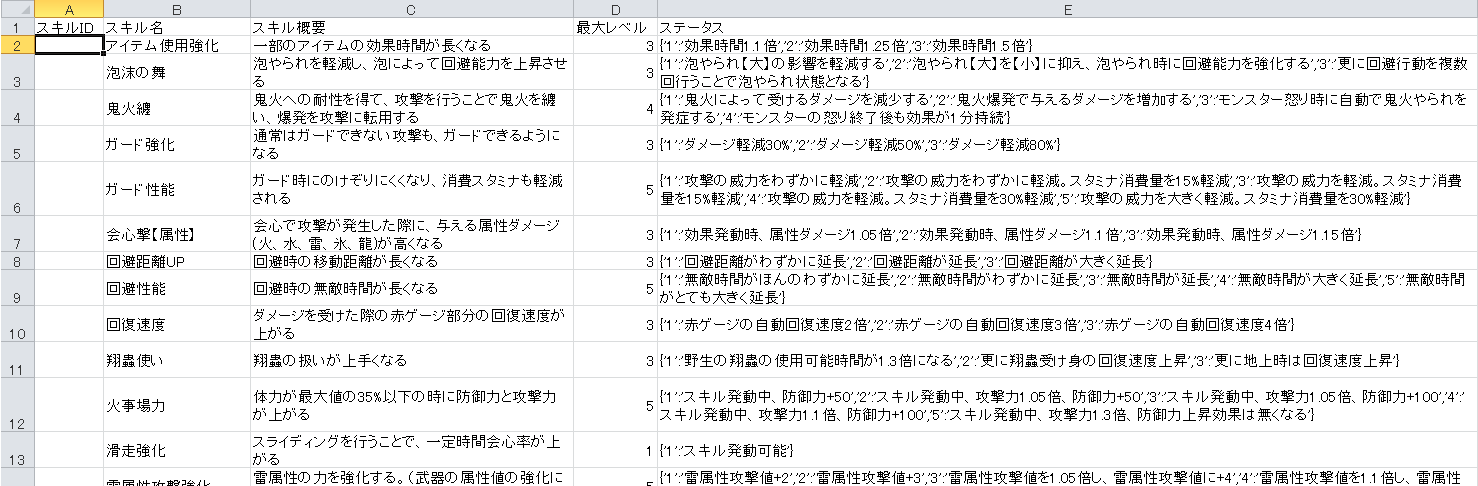
いやぁ、モンハンライズって104つもスキルあるんだねぇ……モンハンワールド時代から比べるとだいぶ増えたなぁ。各スキルのレベルも細分化されているし、こりゃぁスキルの組み合わせが複雑なわけだ。
だからこそ、このスキルシミュレータを作る意義があるってもんだ!
なお、私のようにMSエクセルでデータ作った場合は、CSVファイルに書き出すと、文字コードがシフトJISになっているはずなので、最終的にインポート処理を実行する前にUTF-8に変換しておく必要があるので注意が必要だ。
インポートの実行
データができたら、早速データベースへ一括登録してみる。エンドポイントであるbulk.phpと同じ階層にCSVファイルを置いて、コマンドラインからPHPファイルを直接実行するのだ。
> php bulk.php skills skills.csv
104/104 data has been completed insertion into the "skills" table.
これで登録された。
直接データベースに接続して、確認してみる。
mysql> select count(id) from skills;
+-----------+
| count(id) |
+-----------+
|       104 |
+-----------+
1 row in set (0.00 sec)
おー、入っているねぇ。
では、スキル検索してみよう。スキル名に「属性」という文字が入っているスキルの、レベル2のステータスを検索してみる。
mysql> SELECT `name` as 'Name',JSON_UNQUOTE(`status`->'$."2"') as 'Skill Level 2' FROM `skills` WHERE name like '%属性%';
+-----------------------+-----------------------------------------------------------+
| Name                  | Skill Level 2                                             |
+-----------------------+-----------------------------------------------------------+
| 会心撃【属性】        | 効果発動時、属性ダメージ1.1倍                             |
| 雷属性攻撃強化        | 雷属性攻撃値+3                                            |
| 氷属性攻撃強化        | 氷属性攻撃値+3                                            |
| 睡眠属性強化          | 睡眠の蓄積値を1.1倍し、睡眠の蓄積値に+2                   |
| 属性やられ耐性        | すべての属性やられの効果時間を75%減らす                   |
| 毒属性強化            | 毒の蓄積値を1.1倍し、毒の蓄積値に+2                       |
| 爆破属性強化          | 爆破の蓄積値を1.1倍し、爆破の蓄積値を+2                   |
| 火属性攻撃強化        | 炎属性攻撃値+3                                            |
| 麻痺属性強化          | 麻痺の蓄積値を1.1倍し、麻痺の蓄積値に+2                   |
| 水属性攻撃強化        | 水属性攻撃値+3                                            |
| 龍属性攻撃強化        | 龍属性攻撃値+3                                            |
+-----------------------+-----------------------------------------------------------+
11 rows in set (0.00 sec)
イイ感じだ。なんかスキルシミュレータっぽくなってきた(笑)
ついでに、武器と防具のデータもいくつか登録してみる。
> php bulk.php weapons weapons.csv
2/2 data has been completed insertion into the "weapons" table.

> php bulk.php armors armors.csv
10/10 data has been completed insertion into the "armors" table.
テーブルを見てみよう。
mysql> select id,name,series,defense,slot1,slot2,slot3,skills from armors;
+----+--------------------------------+-----------------------+---------+-------+-------+-------+--------------------------------------------------------+
| id | name                           | series                | defense | slot1 | slot2 | slot3 | skills                                                 |
+----+--------------------------------+-----------------------+---------+-------+-------+-------+--------------------------------------------------------+
|  1 | カムラノ装【頭巾】             | カムラノ装            |       1 |     0 |     0 |     0 | {"精霊の加護": 1}                                      |
|  2 | カムラノ装【上衣】             | カムラノ装            |       1 |     0 |     0 |     0 | {"翔蟲使い": 1}                                        |
|  3 | カムラノ装【手甲】             | カムラノ装            |       1 |     0 |     0 |     0 | {"火事場力": 1}                                        |
|  4 | カムラノ装【腰巻】             | カムラノ装            |       1 |     0 |     0 |     0 | {"見切り": 1}                                          |
|  5 | カムラノ装【脚絆】             | カムラノ装            |       1 |     0 |     0 |     0 | {"壁面移動": 1}                                        |
|  6 | カムラノ装【頭巾】覇           | カムラノ装・覇        |      30 |     1 |     0 |     0 | {"死中に活": 1, "精霊の加護": 1}                       |
|  7 | カムラノ装【上衣】覇           | カムラノ装・覇        |      30 |     1 |     0 |     0 | {"見切り": 1, "壁面移動": 1, "翔蟲使い": 1}            |
|  8 | カムラノ装【手甲】覇           | カムラノ装・覇        |      30 |     2 |     0 |     0 | {"見切り": 2, "火事場力": 1}                           |
|  9 | カムラノ装【腰巻】覇           | カムラノ装・覇        |      30 |     1 |     1 |     0 | {"見切り": 1, "翔蟲使い": 1}                           |
| 10 | カムラノ装【脚絆】覇           | カムラノ装・覇        |      30 |     1 |     0 |     0 | {"壁面移動": 1, "死中に活": 1}                         |
+----+--------------------------------+-----------------------+---------+-------+-------+-------+--------------------------------------------------------+
10 rows in set (0.00 sec)

mysql> select id,name,tree,attack from weapons;
+----+--------------------------+-----------------+--------+
| id | name                     | tree            | attack |
+----+--------------------------+-----------------+--------+
|  1 | カムラノ鉄大剣Ⅰ          | カムラ派生      |     50 |
|  2 | カムラノ鉄大剣Ⅱ          | カムラ派生      |     60 |
+----+--------------------------+-----------------+--------+
2 rows in set (0.00 sec)
今回はここまで。
次回は、フロントエンド側のモックアップを開発していく。
